
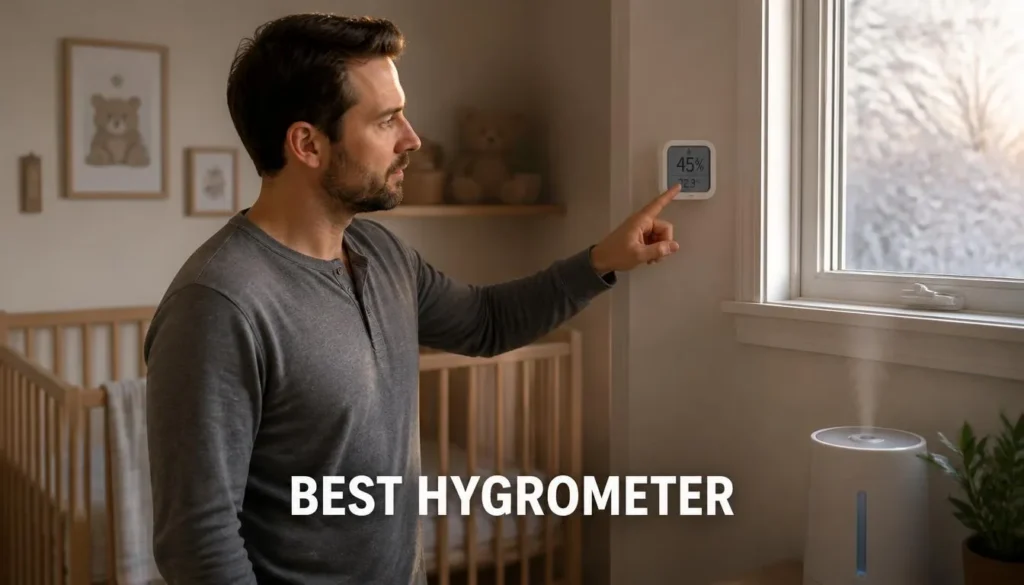

The best hygrometer for most homes is a plain standalone display such as the TempPro TP50, because the job is only to show whether indoor air stays inside the 30 to 50 percent relative humidity range the EPA advises. Choose a model with an app only if you want phone alerts or a history graph.

We narrowed the field to ten units across four connection types: standalone displays, Bluetooth, Wi-Fi and hub-based sensors. A digital hygrometer for home use is simple to run, so the real choice is whether you want alerts or only a number you glance at. Every accuracy figure below is a maker claim.
My Recommended Top 3 Best-Buys for Hygrometers: Reviewed and Rated

- The 10-second refresh updates temperature and humidity often enough to follow a shower or a kettle.
- The high and low records show the extremes for both temperature and humidity.
- The Fahrenheit and Celsius selector switches units with one button.
- The comfort icons show dry, comfortable or wet air with three face symbols.
- The 2.3-inch LCD uses large bold numbers that stay readable from an angle.
- The three mounting options are a hanging hole, a tabletop stand and a magnet.
- The Swiss-made sensor is rated by the maker at +/-3% RH for humidity.
- The 3-inch LCD shows large numbers plus dry, comfort and wet indicators.
- The app alerts notify your phone when a preset temperature or humidity range is crossed.
Best Hygrometer Reviews 2026: 10 Top Models for Home Humidity
Our ten picks run from single-battery tabletop displays to a Zigbee sensor that needs a gateway for its connected features. If you want a hygrometer for home use with no app, start with the first five entries. If you want remote alerts, go to the Govee, GoveeLife, SONOFF, Tapo and SwitchBot reviews. Accuracy figures are maker claims that we have not verified.
1. TempPro TP50 Digital Hygrometer
The TempPro TP50 Digital Hygrometer (formerly ThermoPro) is the unit we would hand to most households first, because it does one job with no setup. It shows humidity and temperature on a standalone screen with no app to open and no account to create.
TempPro TP50 Digital Hygrometer Specs
| Type | Standalone digital hygrometer and thermometer |
| Humidity Accuracy (maker claim) | +/-2 to 3% RH |
| Temperature Accuracy (maker claim) | +/-1F |
| Connectivity | None |
| Power | 1 AAA battery (included) |
| Mounting | Tabletop stand and magnetic back |
| Display | Digital LCD with high and low records |
Key Features
- The 10-second refresh updates temperature and humidity often enough to follow a shower or a kettle.
- The high and low records show the extremes for both temperature and humidity.
- The Fahrenheit and Celsius selector switches units with one button.
- The tabletop stand and magnetic back let you place it on a counter or stick it to a fridge.
- The included AAA battery powers the unit straight out of the box.
The maker claims +/-2 to 3% RH humidity accuracy and +/-1F temperature accuracy. Those are maker figures, not numbers we measured, and no third-party program certifies consumer hygrometer accuracy. In our read, that range is typical for a simple standalone unit.
It also keeps high and low records for both readings, which is more useful than it sounds. A morning-versus-evening swing shows whether a room only gets damp after showers or cooking. We found that pattern more informative than any single reading.
The magnetic back lets you stick it to a fridge or steel shelf.
Why We Chose This
We chose it as the Best Overall pick because it pairs a clear maker-stated accuracy range with the simplest setup in the group, and it suits a bedroom, living room or office without extra gear.
One AAA battery is included, so it works the moment you open the box.
The one gap we want to flag is calibration. The listing does not mention a calibration setting, so you cannot correct the reading if it sits a few points off. A simple salt test still shows the difference, and you can keep a note of it.
Pros
- No-setup operation
- Maker-stated humidity accuracy range
- High and low records
- Quick 10-second refresh
- Stand and magnet placement
- Battery included
- Small, light body
Cons
- No calibration setting listed
- No phone link or alerts
It is a basic unit, with no phone link, no alerts and no history beyond the high and low records. If you want a warning when a damp room passes a set level, look at the Bluetooth and Wi-Fi models later in this list. For a room you pass every day, a standalone screen is enough.
Final Verdict
The TP50 gives you maker-stated accuracy, quick refreshes and zero setup in a small body, which covers what most homes need. Pick a smart model only if you want alerts. It is the default recommendation.
2. DOQAUS Digital Hygrometer Z-001
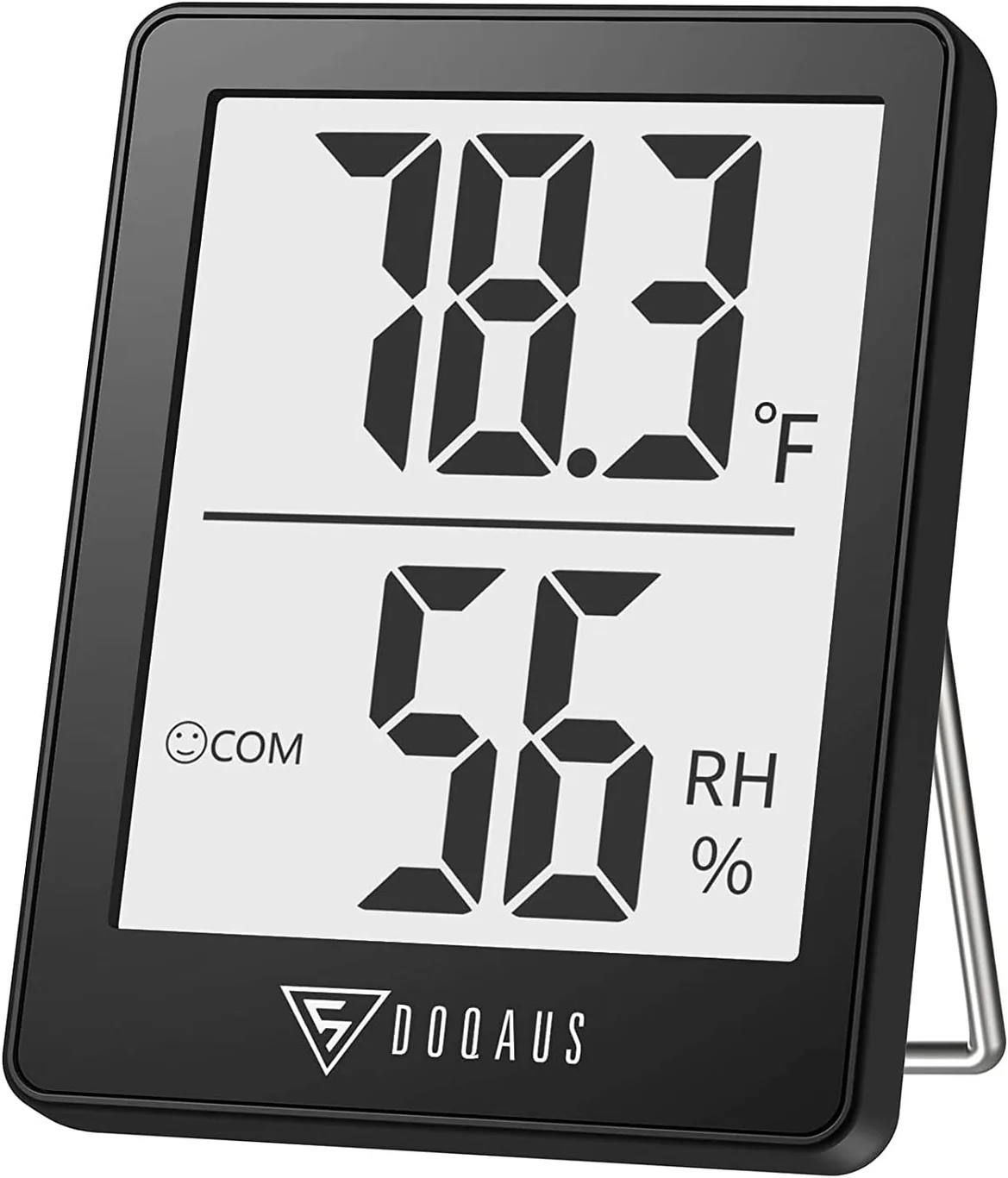
Next, the DOQAUS Digital Hygrometer Z-001 is our budget pick, and it earns that slot on usability rather than a long spec sheet. Its 2.3-inch LCD with large numbers is easy to read from across a room, and three face icons mark the air as dry, comfortable or wet.
DOQAUS Digital Hygrometer Z-001 Specs
| Type | Standalone digital hygrometer and thermometer |
| Humidity Accuracy (maker claim) | Not stated in the listing |
| Temperature Accuracy (maker claim) | +/-1F |
| Connectivity | None |
| Power | Battery type not stated in the listing |
| Mounting | Hanging hole, tabletop stand and magnet |
| Display | 2.3-inch LCD with dry, comfort and wet icons |
Key Features
- The comfort icons show dry, comfortable or wet air with three face symbols.
- The 2.3-inch LCD uses large bold numbers that stay readable from an angle.
- The three mounting options are a hanging hole, a tabletop stand and a magnet.
- The Fahrenheit and Celsius button switches temperature units with one press.
- The compact body measures about 1.8 inches wide by 2.3 inches tall.
The icons are the real draw for a first-time buyer. If you do not remember whether 45 percent humidity is good, the comfort icon tells you at a glance, and it prompts you to adjust a humidifier or dehumidifier. We like that approach for a bedroom or nursery, where nobody wants to read a table.
The maker lists +/-1F temperature accuracy, but the listing gives no humidity accuracy figure, and we will not guess one. Treat the icons as a rough guide, and run a salt test if you need to know how far off it sits.
The three mounting options cover a wall hook, a shelf or a fridge door.
Why We Chose This
We chose it as the Best Budget pick because the comfort icons and flexible mounting make it easy to use, even though the listing leaves the humidity accuracy unstated.
The spec table lists a 10% to 99% operating humidity range, which covers normal household conditions.
The trade-off is plain. With no stated humidity accuracy and no calibration setting mentioned, you are trusting the sensor until you check it yourself. The listing also does not say which battery it takes. We would still pick it for a spare room or closet where a rough read is enough.
Pros
- Easy-to-read large display
- Comfort icons for quick checks
- Three mounting methods
- Maker-stated temperature accuracy
- Compact, light body
- 5-second refresh claimed
- Simple one-button operation
Cons
- No humidity accuracy stated
- No calibration setting listed
It has no app, no alerts and no history, so it only tells you the current state. That is fine for a closet or kids' room you pass daily. If you want to track changes over time, step up to a unit with records or an app, such as the Govee H5075 Bluetooth Hygrometer Thermometer.
Final Verdict
A small, readable hygrometer with comfort icons and flexible mounting. Treat the humidity reading as approximate until you check it against a salt test. It is the easiest low-cost starter.
3. Govee H5075 Bluetooth Hygrometer Thermometer
Stepping up, the Govee H5075 Bluetooth Hygrometer Thermometer is the one we reach for when a standalone display is not enough. It pairs with a phone app and, within Bluetooth range, sends an alert when a reading leaves a range you set. That makes it a true smart hygrometer for a cellar, nursery or bedroom.
Govee H5075 Bluetooth Hygrometer Thermometer Specs
| Type | Bluetooth smart hygrometer and thermometer |
| Humidity Accuracy (maker claim) | +/-3% RH |
| Temperature Accuracy (maker claim) | +/-0.54F |
| Connectivity | Bluetooth app, 164 ft claimed range |
| Power | 2 alkaline batteries (included) |
| Mounting | Tabletop |
| Display | 3-inch LCD with comfort indicators and max and min records |
Key Features
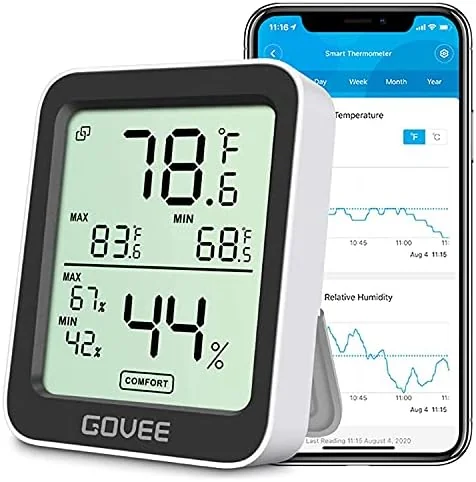
- The Swiss-made sensor is rated by the maker at +/-3% RH for humidity.
- The 3-inch LCD shows large numbers plus dry, comfort and wet indicators.
- The app alerts notify your phone when a preset temperature or humidity range is crossed.
- The data history keeps 20-day curve graphs and exports 2 years of data to CSV.
- The 2-second refresh follows quick changes in the room, according to the maker.
The maker claims +/-3% RH humidity accuracy and about half a degree of temperature accuracy, with a 2-second refresh. Those are maker figures, not our measurements. The 3-inch screen also shows comfort indicators and max and min records, so you can use the unit without opening the app.
The app is where it pulls ahead. It keeps 20-day curve graphs and lets you export the past 2 years of data as a CSV file. We think that history is the main reason to buy a Bluetooth model, because it shows whether a damp spot is a one-off or a daily pattern.
The listing claims a 164-foot range, which walls will likely shorten.
Why We Chose This
We chose it as the Best Bluetooth App Pick because it adds alerts, graphs and CSV export while keeping a readable display on the unit itself.
The box includes two batteries, so setup is quick.
The thing we want to flag is range. Alerts reach your phone over Bluetooth, and the listing does not claim alerts away from home, so a Wi-Fi model suits you better if you travel. We also noticed that the spec table lists operating humidity up to 90%, which is fine for homes but worth knowing for steamy spaces.
Pros
- App alerts on preset ranges
- 20-day graphs in the app
- CSV export of 2 years of data
- Readable 3-inch display
- Max and min records on the unit
- Fast 2-second refresh claimed
- Batteries included
Cons
- Alerts limited to Bluetooth range
- Operating humidity tops out at 90%
A Bluetooth unit generally syncs its history when your phone is in range, so open the app now and then. If you only want a number on a screen, the standalone TempPro and DOQAUS units ask less of you. The Govee earns its place when you want the history.
Final Verdict
The H5075 is a practical way to add alerts and history to a room you care about, without moving to a hub-based system. Pick it if you want your phone to tell you when humidity drifts. It is the best entry point to app alerts.
4. TempPro TempAir TP49 Digital Hygrometer
After that, the TempPro TempAir TP49 Digital Hygrometer is the smaller, simpler sibling of our top pick from the same maker. It has a slim body about 0.7 inches deep and a compact display with large digits. We see it as the one to buy when you want a sensor in every room.

TempPro TempAir TP49 Digital Hygrometer Specs
| Type | Standalone digital hygrometer and thermometer |
| Humidity Accuracy (maker claim) | +/-2 to 3% RH |
| Temperature Accuracy (maker claim) | +/-1F |
| Connectivity | None |
| Power | Alkaline battery, 1.5 volts (included) |
| Mounting | Tabletop stand, magnetic back and hanging mount |
| Display | Compact LCD with large digits |
Key Features
- The maker-claimed sensor accuracy is +/-2 to 3% RH and +/-1F.
- The 10-second refresh keeps temperature and humidity readings current.
- The compact LCD uses large bold digits that stay readable from an angle.
- The three placement options are a tabletop stand, a magnetic back and a hanging mount.
- The slim body measures about 0.7 inches deep and weighs 35 grams.
The maker claims +/-2 to 3% RH humidity accuracy and +/-1F temperature accuracy, the same figures as the TP50, with a 10-second refresh. Those are maker claims, not figures we verified. If two sensors in one room disagree, a salt test settles which one to trust.
Placement is flexible, with a tabletop stand, a magnetic back or a hanging mount, according to the listing. That makes it easy to move between a nursery, a craft room or a grow tent without buying anything else. We like that a unit this light does not demand a fixed spot.
It is light, at about 35 grams.
Why We Chose This
We chose it as the Best Everyday Digital pick because it offers the same maker-stated accuracy as the TP50 in a smaller body that suits room-by-room use.
An alkaline battery is included, rated at 1.5 volts.
The difference from the TP50 is mostly size, so do not buy both for the same room. Like its sibling, the listing mentions no calibration setting, no app and no alerts. We would pick the TP49 over the TP50 only when space is tight or you are fitting out several rooms.
Pros
- Small, light body
- Same maker claims as the TP50
- Three placement options
- Large digits on a compact display
- Suits multi-room setups
- Fast 10-second refresh
- Battery included
Cons
- No calibration setting listed
- No app or alerts
Based on the listing, expect the same simple behavior as its sibling: a number on a small screen. That is all most rooms need, and it keeps the setup free of apps and pairing. The listing names an RV, a craft room and a guitar room as uses, which shows how broad the intended placement is.
Final Verdict
The TP49 is a small, easy-to-place digital hygrometer with the same maker claims as the TP50. Choose it when you are setting up several rooms. It is the sensible second-room unit.
5. Smartro SC42 Digital Hygrometer
From there, the Smartro SC42 Digital Hygrometer suits anyone who cares about a clear display and about correcting the reading. It has a 3.5-inch backlit LCD, and a touch on the top turns the light on for 10 seconds.

Smartro SC42 Digital Hygrometer Specs
| Type | Standalone digital hygrometer and thermometer |
| Humidity Accuracy (maker claim) | +/-2% RH |
| Temperature Accuracy (maker claim) | About +/-0.5F |
| Connectivity | None, cannot connect to phones |
| Power | 2 AAA batteries (not included) |
| Mounting | Retractable stand, two magnets and wall-mount hole |
| Display | 3.5-inch backlit LCD with 24-hour and all-time records |
Key Features
- The 3.5-inch backlit LCD lights up for 10 seconds with a touch on the top.
- The 24-hour and all-time records track highs and lows for temperature and humidity.
- The manual calibration lets you correct the reading when placement or surroundings skew it.
- The retractable stand, two magnets and wall-mount hole cover table, fridge and wall placement.
- The 13-month warranty is listed, excluding man-made damage.
The maker claims +/-2% RH humidity accuracy and about half a degree F of temperature accuracy, the tightest humidity claim among the first six picks. Those are maker claims, not figures we verified, and no third-party program certifies them.
What sets it apart is manual calibration. If a salt test shows the unit reading a few points off, the listing says you can correct it by hand. We think that matters more than a small gain in claimed accuracy, because a correctable sensor stays useful.
It records 24-hour and all-time highs and lows for both readings.
Why We Chose This
We chose it as the Best Compact Digital pick because it packs a large backlit display, long-term records and calibration into a small body that sits on a table, hangs on a wall or sticks to a fridge.
Two AAA batteries are required, and the listing says they are not included.
Two limits stand out. The listing says the unit cannot connect to phones, so there are no alerts or app history. The backlight is also not always on, which the listing itself notes, so reading it in a dark room takes a tap. We consider both acceptable for a bedside or closet unit.
Pros
- Large backlit display
- Manual calibration supported
- 24-hour and all-time records
- Tightest maker humidity claim here
- Three mounting methods
- 13-month warranty listed
- Comfort indicator on screen
Cons
- No phone connection
- Batteries not included
Mounting is flexible, with a retractable stand, two magnets and a wall-mount hole. If you are watching a closet, wine cellar or nursery, the all-time records show the highest and lowest readings it has seen, which helps you catch a spike you missed.
Final Verdict
The SC42 is the unit to buy when you want a clear screen and the ability to correct the reading, and you do not need a phone link. It is the best correctable standalone unit.
6. GoveeLife H5179 WiFi Hygrometer Thermometer
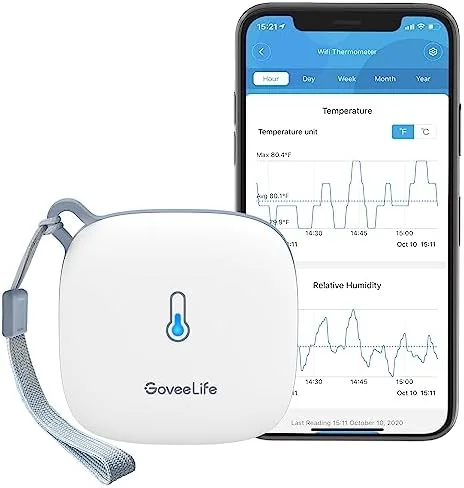
Stepping up, the GoveeLife H5179 WiFi Hygrometer Thermometer is the option for people who want push alerts over Wi-Fi. Within the Govee line, this Govee WiFi thermo hygrometer is the one to look at if a Bluetooth range limit worries you.
GoveeLife H5179 WiFi Hygrometer Thermometer Specs
| Type | Wi-Fi smart hygrometer and thermometer |
| Humidity Accuracy (maker claim) | +/-3% RH |
| Temperature Accuracy (maker claim) | +/-0.54F |
| Connectivity | Wi-Fi with app push alerts |
| Power | 3 AA batteries (included) |
| Mounting | Lanyard loop |
| Display | No on-device display; readings appear in the app |
Key Features
- The Swiss-made sensor is rated for +/-3% RH and +/-0.54F, with a 2-second refresh.
- The push alerts notify you when a preset value is exceeded.
- The data views include daily, weekly and monthly filters, 20-day graphs and a 2-year export.
- The -4F to 140F supported range suits cold or warm spaces such as a cellar or incubator.
- The GoveeLife link lets it work with a GoveeLife humidifier for automatic adjustments.
The maker claims +/-3% RH humidity accuracy and +/-0.54F temperature accuracy, with a 2-second refresh. Those are maker figures, not our measurements. The listing names reptile tanks, incubators, greenhouses, basements and wine cellars as uses.
Its push notifications fire when a preset value is exceeded. Because it connects over Wi-Fi rather than Bluetooth, it should be able to reach you away from home, though the listing does not spell that out. We would confirm how setup works before relying on it.
Data views come in daily, weekly and monthly filters, with 20-day graphs.
Why We Chose This
We chose it as the Best WiFi Hygrometer because it brings app alerts and 2 years of exportable data to a unit that connects over Wi-Fi.
The box includes three AA batteries.
The thing we want to flag is the short track record. The model has a smaller owner base than the older Govee H5075 Bluetooth Hygrometer Thermometer, so there is less long-term feedback. The listing also does not say whether a separate gateway is required, so check that before you buy.
Pros
- Wi-Fi push alerts
- 20-day graphs and 2-year export
- Fast 2-second refresh claimed
- Works with a GoveeLife humidifier
- Wide supported temperature range
- Batteries included
- Lanyard loop for easy placement
Cons
- Shorter track record
- Gateway need not stated in listing
A useful extra is the link to other GoveeLife appliances. The listing says pairing with a GoveeLife humidifier adjusts the air to a comfortable range automatically. If you already own one, that automation could be the reason to choose this model. If not, a Bluetooth unit covers most homes with less complexity.
Final Verdict
Choose the H5179 if you want Wi-Fi push alerts and humidifier automation within the Govee line. Confirm the setup details first, since the track record is short. It is the Wi-Fi pick for alerts.
7. SONOFF SNZB-02UL Zigbee Hygrometer
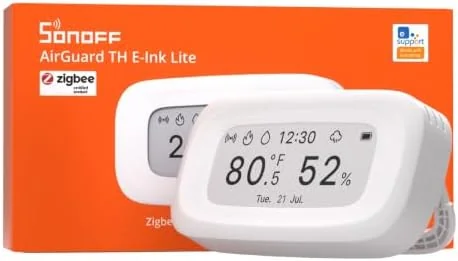
Next, the SONOFF SNZB-02UL is the pick for readers who already run a Zigbee hub and want humidity data inside that system. It pairs a 2.9-inch E-Ink display with an app that logs readings, so you can glance at the room or check the history later. What stood out in our comparison is how much the small case carries: temperature, humidity, time, date and weather share one screen.
SONOFF SNZB-02UL Zigbee Hygrometer Specs
| Type | Zigbee smart sensor |
| Humidity Accuracy (maker claim) | +/-2% RH |
| Temperature Accuracy (maker claim) | +/-0.4F |
| Connectivity | Zigbee, gateway needed for app and alerts |
| Power | Battery included |
| Mounting | Adhesive backing |
| Display | 2.9-inch E-Ink |
Key Features
- The 2.9-inch E-Ink screen shows temperature, humidity, time, date and weather on one display with a wide viewing angle.
- The 6-hour on-screen trend appears at the press of a button, and the app keeps up to 6 months of history.
- Dew point and VPD readings are logged next to temperature and humidity, which suits plant care and storage rooms.
- Custom alert thresholds send an app alert when humidity or temperature leaves the limits you set.
- Smart scenes can switch a fan or humidifier through a smart plug, so the sensor can act on what it reads.
The SONOFF works without a hub as a standalone display for temperature, humidity and six-hour history. A compatible Zigbee gateway is required for app access, alerts, automation, time, date and weather.
On accuracy, the maker claims a +/-2% RH humidity reading and +/-0.4F temperature reading. Those are maker claims, and we have not verified them independently. No third-party program certifies consumer hygrometer accuracy, so a salt test in a sealed bag is the fair way to check your own unit.
The maker says readings refresh every 5 seconds, which is quick for a room sensor.
Why We Chose This
We chose it because it brings humidity, dew point and VPD readings into a Zigbee setup on an E-Ink screen that stays readable in bright light.
The listed operating range is 32F to 122F, so it suits living spaces, a wine cellar or a greenhouse, not a freezer.
Our one flag: this listing has a smaller owner base than the older models above it, so we have less long-term evidence about drift and battery life. The listing does include a 2-year warranty, which is some cover. We would treat the first few weeks as a check against a second hygrometer in the same room.
Pros
- Fits an existing Zigbee smart home
- E-Ink screen is easy to read in bright light
- Six months of history in the app
- Dew point and VPD readings included
- Custom alerts for humidity and temperature
- Smart plug scenes can run fans or humidifiers
- Battery and adhesive backing in the box
Cons
- Gateway needed for app and alerts
- Smaller owner base than older models
For placement, the adhesive backing makes wall mounting easy, but keep the sensor at mid-room height and away from vents and windows. If you add a gateway, the sensor also has to stay within reach of it, so check that distance before you stick it down. We would use the on-screen trend for a quick read and the app for the longer pattern.
Final Verdict
If Zigbee already runs your home, this sensor adds humidity, dew point and VPD logging on a screen you can read at a glance. Without a gateway it still works as a standalone display, but the app, alerts and automation need one. It is the right sensor for an existing Zigbee setup.
8. AcuRite 01080M Pro Accuracy Humidity Gauge
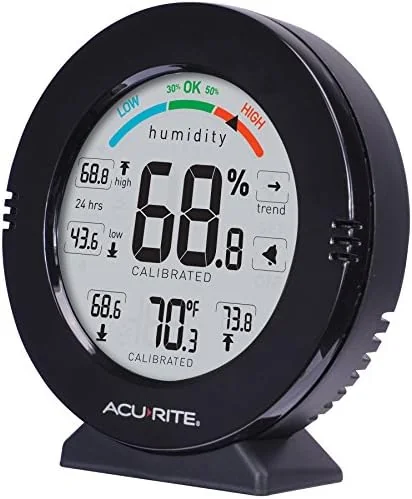
After that, the AcuRite 01080M goes the opposite way from the app-based models: no hub, no phone, just a display that does the work. Programmable high and low humidity alarms and a LOW / OK / HIGH indicator sit on the screen itself. We kept coming back to this one for readers who want a clear answer from a glance at a shelf.
AcuRite 01080M Pro Accuracy Humidity Gauge Specs
| Type | Standalone digital gauge |
| Humidity Accuracy (maker claim) | +/-2% RH |
| Temperature Accuracy (maker claim) | +/-0.5F |
| Connectivity | None |
| Power | Not stated in the listing |
| Mounting | Magnet and tabletop stand |
| Display | Digital, with LOW / OK / HIGH indicator |
Key Features
- The manual calibration option lets you adjust the reading if a salt test shows the unit is off.
- Measurements every 10 seconds catch changes in temperature and humidity quickly.
- High and low records cover the past 24 hours and all time, so you can see the swings you missed.
- Programmable humidity alarms warn you when the room moves outside the range you set.
- The LOW / OK / HIGH indicator at the top of the display shows at a glance whether humidity sits in the recommended range.
The listed claim is +/-2% RH and +/-0.5F, plus an operating range of 1 to 99% RH and up to 158F. These are the maker's figures, and we have not verified them independently. The calibration option is the useful part, because it lets you correct the reading yourself instead of living with it.
The alarm is what separates this gauge from a plain display. You set the high and low limits, and the unit flags a reading outside them, so it works well in a nursery or a closet where you do not want to open an app. The unit measures 3.75 inches wide, 4 inches high and 1.25 inches deep.
The manufacturer listed on Amazon is Chaney Instruments, and the gauge ships with an instruction manual.
Why We Chose This
We chose it for readers who want programmable humidity alarms and manual calibration on the device, with no app, hub or account.
It sits on a tabletop stand or sticks to metal with a built-in magnet, such as a furnace or a fridge side.
Our one flag: the listing does not say what battery the unit takes or whether one is included, since the included components are only the gauge and the manual. Check the box contents before you plan to place it. Also, there is no history export, so the 24 hour and all-time records are the only memory it has.
Pros
- Programmable high and low humidity alarms
- LOW / OK / HIGH indicator reads at a glance
- Manual calibration option on the unit
- No hub, phone or account needed
- 24 hour and all-time high and low records
- Magnet and tabletop stand mounting
- Wide operating humidity range
Cons
- No app, history export or remote alerts
- Battery details not stated in the listing
Place it at mid-room height, away from vents, windows and humidifier output, and give it time to settle after you move it. If a salt test shows an offset, use the manual calibration and test again. In our view that on-device correction is the reason to pick this gauge over cheaper fixed-reading displays.
Final Verdict
This gauge suits anyone who wants alarms and calibration on the device itself, and can live without an app or logging. Check the battery situation before you buy. It is the no-app alarm gauge.
9. Tapo T315 Smart Temperature and Humidity Monitor
From there, the Tapo T315 is TP-Link's smart-home sensor, and it comes with a 2.7-inch E-Ink display that shows temperature, humidity, comfort level, battery status and signal strength. It is built for people who already use, or plan to buy, the Tapo hub. What stood out in our comparison is the pairing of a glare-free screen with free data export.

Tapo T315 Smart Temperature and Humidity Monitor Specs
| Type | Smart hub-based sensor |
| Humidity Accuracy (maker claim) | +/-3% RH |
| Temperature Accuracy (maker claim) | +/-0.54F |
| Connectivity | Tapo hub required |
| Power | 2 AAA batteries included |
| Mounting | Tabletop or 3M adhesive |
| Display | 2.7-inch E-Ink |
Key Features
- The 2.7-inch E-Ink display shows temperature, humidity, comfort level, battery status and signal strength with no screen glare.
- Updates every 2 seconds keep the reading close to real time, according to the maker.
- Two years of free data export come with periodic summaries and visual graphs in the app.
- Two included AAA batteries are rated by TP-Link for up to 2 years, based on its own lab results.
- The Swiss-made sensor chip is the maker's stated basis for its accuracy claim.
The listing says a hub is required, and the Item Highlight repeats it. That means the sensor is really a second purchase if you do not already own the Tapo hub. For a household that does, adding a humidity sensor is straightforward, and the data lands in the same app as the rest of the Tapo devices.
The accuracy claim is +/-3% RH and about +/-0.54F (0.3C on the spec table). That is a maker claim and we have not verified it independently. In our experience a 3% claim is fine for tracking trends and spotting a damp room, but it is looser than the 2% units further up this list.
The listed operating range is 0 to 99% RH, with an upper temperature limit of 140F.
Why We Chose This
We chose it because it combines a glare-free E-Ink screen with free two-year data export for homes already built around the Tapo hub.
The sensor sits on a tabletop or sticks up with the included 3M adhesive.
Our one flag: the up to 2 years battery life is TP-Link's laboratory figure under normal use, and the listing itself says real life may vary. We would plan for a battery swap sooner than that and judge the real number after a season. The hub purchase is the other cost to weigh before you commit.
Pros
- Glare-free E-Ink screen with comfort level
- Two years of data export at no charge
- Updates every 2 seconds per the maker
- Batteries included in the box
- Adhesive and tabletop mounting options
- Graphs and summaries in the app
- Signal and battery status shown on screen
Cons
- Tapo hub required
- Battery life is a lab claim
Place it at mid-room height, away from vents and windows, and keep it within signal range of the hub. The on-screen signal indicator is a handy check when you move it between rooms. If you want to compare your bedroom and basement readings, the app graphs make that easier than reading two standalone displays.
Final Verdict
If you already own the Tapo hub, this sensor is an easy add with a readable screen and free data export. If you do not, the extra hub purchase is a reason to look at standalone models first. It is the natural sensor for a Tapo household.
10. SwitchBot Indoor Hygrometer Thermometer
Finally, the SwitchBot Indoor Hygrometer Thermometer closes the list as a Bluetooth option with a 3-inch display and a long list of app features. It earns the last slot as a flexible all-rounder that mounts several ways. What we noticed first is the generous data storage and a published humidity accuracy of +/-2% RH.

SwitchBot Indoor Hygrometer Thermometer Specs
| Type | Bluetooth smart hygrometer |
| Humidity Accuracy (maker claim) | +/-2% RH (10% to 90% RH), +/-4% outside |
| Temperature Accuracy (maker claim) | +/-0.2C (about 0.36F) |
| Connectivity | Bluetooth, hub needed for push alerts |
| Power | 3-volt battery |
| Mounting | Wall, magnetic surface or upright stand |
| Display | 3-inch LCD |
Key Features
- The 3-inch display is bolder than earlier models and uses icons to show whether room conditions meet your set limits.
- A 394 ft connecting distance is claimed with no obstacles, so walls will shorten it in a real home.
- Up to 68 days of on-board storage and 2 years in the app can be exported as a CSV file.
- Dew point and VPD readings can serve as scene conditions in the SwitchBot app.
- Wall, magnet or tabletop mounting gives you three stand angles to choose from.
The hub matters here. Push notifications and unlimited cloud storage need the SwitchBot Hub, per the listing. Without it, the unit works over Bluetooth within range and stores data on the device and in the app. That makes it close to the Govee H5075 Bluetooth Hygrometer Thermometer in spirit, with the hub as an optional step up.
SwitchBot specifies humidity accuracy of +/-2% RH from 10% to 90% RH and +/-4% outside that band, at 25C. Temperature accuracy is +/-0.2C from 0C to 65C. These are manufacturer claims; use the app calibration setting if a reference check shows an offset.
The listing also notes a one-year warranty, with issues reported through the app.
Why We Chose This
We chose it as a flexible Bluetooth fallback with a large display, long data history and room to grow into a hub.
SwitchBot specifies measurements down to -4F (-20C), with temperature accuracy of +/-0.4C below 32F (0C).
Our one flag: the 394 ft range figure is a best case, so expect less through walls. For a basement or bedroom reading, treat the number as a trend until you have checked it against a salt test.
Pros
- Large 3-inch display with status icons
- 68 days of on-board storage
- Two years of app history with CSV export
- Dew point and VPD readings
- Wall, magnet and stand mounting
- Long claimed Bluetooth range
- Calibration support in the app
Cons
- Range claim is a best case
- Push alerts need the SwitchBot Hub
Place it at mid-room height, away from vents, windows and humidifier output, and let it settle after any move. The three stand angles are a small but useful touch if you read it from a desk or a shelf. If you later add the hub, you gain push alerts and cloud storage without replacing the sensor.
Final Verdict
This is a capable Bluetooth sensor with strong data features, with a published +/-2% RH humidity claim. Buy it if you value the display and storage, and verify the reading yourself. It is the flexible Bluetooth fallback.
How to Choose the Best Hygrometer
A hygrometer reads relative humidity, and the useful ones read it steadily enough that you can act on the number. For most homes the target is simple: keep indoor humidity below 60 percent, ideally between 30 and 50 percent. The six factors below are the ones we weighed on every model in this guide.
Humidity accuracy and calibration
Accuracy is the first thing to check and the hardest to confirm. Every figure in this guide is the maker's own claim, and no third-party program certifies consumer hygrometer accuracy. In our experience the spec sheet only tells half the story.
Two units that each claim plus or minus 3 percent RH can legitimately read up to 6 points apart. If you want the most accurate hygrometer for home use, look for a stated plus or minus 2 percent figure and a way to apply an offset, then confirm the unit yourself.
Here is what each maker states for humidity and temperature:
The Smartro SC42 and the AcuRite 01080M both list manual calibration, and the SwitchBot listing mentions several calibration methods. The TempPro TP50 listing does not mention a calibration setting, so a check with salt is worth doing on any unit.
A common home check is the salt test:
- Dampen a small amount of plain table salt until it is a slush, not a pool.
- Seal the salt and the hygrometer together in a zip bag, with the display visible.
- Wait 8 to 24 hours, then read the display.
- A reading near 75 percent RH is expected. The gap from 75 is the offset to apply, or the amount to mentally correct by.
| Model | Humidity claim | Temperature claim |
| TempPro TP50 | plus or minus 2 to 3% RH | plus or minus 1F |
| DOQAUS Z-001 | not stated in the listing | plus or minus 1F |
| Govee H5075 | plus or minus 3% RH | about half a degree |
| TempPro TempAir TP49 | plus or minus 2 to 3% RH | plus or minus 1F |
| Smartro SC42 | plus or minus 2% RH | about half a degree |
| GoveeLife H5179 | plus or minus 3% RH | about half a degree |
| SONOFF SNZB-02UL | plus or minus 2% RH | plus or minus 0.4F |
| AcuRite 01080M | plus or minus 2% RH | plus or minus 0.5F |
| Tapo T315 | plus or minus 3% RH | about half a degree |
| SwitchBot Indoor Hygrometer Thermometer | plus or minus 2% RH | plus or minus 0.2C |
Display and readability
A reading you cannot see from across the room rarely gets checked. Display size and contrast decide how often you look. The Smartro SC42 has a 3.5 in backlit LCD, the Govee H5075 and SwitchBot a 3 in display, and the DOQAUS Z-001 a 2.3 in LCD.
The SONOFF and Tapo units use E-Ink screens, at 2.9 in and 2.7 in. What we found matters more than size is whether you can read the unit in a dim room, and the SC42 is the only listing here that mentions a backlight.
Display features worth having:
- Comfort icons: the DOQAUS Z-001 shows dry, comfort or wet faces for a quick read.
- Status indicator: the AcuRite 01080M shows LOW, OK or HIGH next to the number.
- High and low records: the TempPro TP50 shows them, and the SC42 and AcuRite show 24 hour and all-time highs and lows.
- On-screen trend: the SONOFF SNZB-02UL shows a 6 hour trend on its E-Ink screen.
Smart features and alerts
A smart hygrometer adds an app, a history graph and alerts. Most rooms do not need one, because a standalone display you pass every day does the job. We sort the connected models by how they connect, since that decides what the alerts can do.
This table lays out the connection and history of each connected model:
The H5075 provides app alerts within Bluetooth range. SwitchBot push notifications require a compatible SwitchBot Hub, which enables alerts away from home. The H5179 uses Wi-Fi, and its listing describes push alerts when a preset value is exceeded. That is the feature to look for if you want a notice while you are away, though we have not verified it.
If you do not want an app at all, the AcuRite 01080M offers programmable humidity alarms on the display itself. The Tapo only makes sense if you already run its hub, and the SONOFF needs a gateway for its app and alerts.
| Model | Connection | History and alerts |
| Govee H5075 | Bluetooth, 164 ft claimed range | app alerts, 20-day graph, export past 2 years |
| GoveeLife H5179 | Wi-Fi | app push alerts, 20-day graph, 2-year export |
| SONOFF SNZB-02UL | Zigbee, gateway needed for app and alerts | 6 months in the app, dew point and VPD |
| Tapo T315 | needs the Tapo hub | 2-year data export |
| SwitchBot Indoor Hygrometer Thermometer | Bluetooth, 394 ft claimed range with no obstacles | 68 days on the unit, 2 years in the app; push notifications and cloud storage need the SwitchBot Hub |
Placement and mounting
Where you put a hygrometer changes the reading as much as the sensor does. Mid-room height, away from vents, windows, exterior walls and humidifier output gives the most representative number. After you move a unit, give it time to settle before you trust it.
A basement hygrometer is where the number matters most, since below-grade rooms are where damp problems tend to start. None of the listings claims basement testing, so we judge fit by features. Records of highs and lows show how humid the room gets between visits, which suits a room you rarely enter.
If you shop for the best hygrometer for bedroom use, the practical filters are a display you can read at night and a spot on a shelf or dresser, away from the window, the bed and the humidifier outlet. Keep it a little way from where you sleep, so a humidifier plume does not skew the reading.
Mounting options in this guide:
- DOQAUS Z-001: hanging hole, stand and magnet.
- TempPro TP50: tabletop stand and a magnetic back.
- TempPro TempAir TP49: tabletop, magnet and hanging.
- AcuRite 01080M: magnet and stand.
Power and battery life
Power is a small detail that decides whether a unit keeps running unattended. Every model here runs on batteries, and a dead cell quietly turns a hygrometer into a decoration. Our team checks the battery line on each listing before anything else.
What each listing says about batteries:
- TempPro TP50: 1 AAA battery included.
- TempPro TempAir TP49: takes 1 AAA battery.
- Smartro SC42: takes 2 AAA batteries, which are not included.
- Govee H5075: takes 2 AAA batteries.
- GoveeLife H5179: takes 3 AA batteries, which are included.
- Tapo T315: 2 AAA batteries, claimed to last up to 2 years in the maker's lab tests.
Battery life figures are maker or lab claims, and real life can vary with use. Check what is in the box before you plan to mount a unit somewhere hard to reach.
Data history and logging
History turns a single reading into a trend, which is what you need when you are chasing a damp spot. A graph shows whether humidity spikes with showers, cooking or a change in weather. In our experience a simple high and low record is enough for one room.
How history works across the range:
- On the display: the TempPro TP50 shows high and low records, and the SC42 and AcuRite show 24 hour and all-time highs and lows.
- Govee models: a 20-day graph, with export for the past 2 years on both the H5075 and H5179.
- SwitchBot: 68 days stored on the unit and 2 years in the app.
- SONOFF and Tapo: 6 months in the app for the SONOFF, and a 2-year data export for the Tapo.
Export matters mainly if you want to compare one winter with the next. For a single room that you pass every day, on-screen records cover most needs.
What indoor humidity range should you aim for
The EPA advises keeping indoor relative humidity below 60 percent, ideally between 30 and 50 percent. A hygrometer is how you check that range, and the EPA itself points to a humidity gauge for the job.
Why the range matters:
- Mold and dust mites: the EPA lists both among the common asthma triggers, and both respond to humidity.
- Target band: 30 to 50 percent is the range the EPA gives for the home.
- Upper limit: readings that stay above 60 percent are the signal to act.
A single reading is a snapshot, so check the same spot at different times of day.
If a reading sits outside the band, our view is that a humidifier or dehumidifier is the usual next step, and the hygrometer then tells you whether it is working.
My Overall Verdict
For most homes, a standalone digital unit is all you need, and you only pay for a smart model if you will use alerts and history. Here are the three we would start with.
- TempPro TP50 Digital Hygrometer [Best Overall] - a standalone display with a 10 second refresh, high and low records and a maker claim of plus or minus 2 to 3 percent RH
- DOQAUS Digital Hygrometer Z-001 [Best Budget] - a simple 2.3 in LCD unit with dry, comfort and wet icons and three ways to mount it
- Govee H5075 Bluetooth Hygrometer Thermometer [Best Bluetooth App Pick] - app alerts and a 20-day graph over Bluetooth, with a maker claim of plus or minus 3 percent RH
If you want a notice while you are away, the GoveeLife H5179 uses Wi-Fi. If you already run a Zigbee or Tapo hub, the SONOFF SNZB-02UL and Tapo T315 fit that setup, and the AcuRite 01080M is our pick for alarms on the display with no app.
Whatever you choose, run a salt test once before you rely on the number.
Keep humidity between 30 and 50 percent, and the TempPro TP50 is the best hygrometer to start with.
Why TempPro TP50 Digital Hygrometer Might Be the Best Choice
The TempPro TP50 earns our top spot because it does the one job a hygrometer has to do with the least fuss: it shows humidity and temperature on a standalone display and refreshes every 10 seconds. It runs on the AAA battery in the box, so it can sit on a shelf the day it arrives.
The trade-off is that the listing mentions no calibration setting, and the claim is plus or minus 2 to 3 percent RH. We would confirm it once with a salt test. If you want app alerts or a phone history, the Govee H5075 is the step up.
What stands out:
- 10 second refresh: readings update often enough to follow a shower or a humidifier.
- High and low records: the display keeps humidity and temperature extremes for comparison.
- Stand and magnet: it sits on a tabletop or clings to a metal surface.
- F and C selector: you choose the temperature unit on the unit itself.
- Battery included: one AAA battery ships in the box.
SHOP ON AMAZONAvailability and current price shown on Amazon
FAQs
What is the best hygrometer for home use?
The best hygrometer for home use is a standalone digital unit such as the TempPro TP50, which shows humidity and temperature at a glance, refreshes every 10 seconds and needs no setup. If you want alerts and history on your phone, the Govee H5075 adds a Bluetooth app that works within range.
Are inexpensive hygrometers accurate?
Inexpensive hygrometers are usually accurate enough for a home, since budget digital models commonly claim about 2 to 3 percent RH. Those figures are maker claims rather than measured results, and units can drift over time, so check yours with a salt test and apply an offset if the unit allows it.
What is the most accurate hygrometer for home use?
The most accurate hygrometer for home use on paper is a model with a claimed plus or minus 2 percent RH, such as the AcuRite 01080M, Smartro SC42 or SONOFF SNZB-02UL. Those are maker claims that we have not independently verified, so confirm any unit with a salt test before you trust it.
Where should you put a hygrometer in a basement or bedroom?
Put a hygrometer at mid-room height, well away from vents, windows, exterior walls and humidifier output, in a basement or a bedroom alike. Give the unit time to settle after you move it, because a reading taken straight after a move can still reflect the old spot rather than the new one.
Do you need a smart hygrometer with an app?
You only need a smart hygrometer with Wi-Fi or Bluetooth if you want remote alerts and a history graph, because a standalone display is enough for a room you pass every day. The Tapo T315 needs its hub and the SONOFF SNZB-02UL needs a gateway for app features, so count that extra device before you buy.
References:
- EPA, A Brief Guide to Mold, Moisture and Your Home: https://www.epa.gov/mold/brief-guide-mold-moisture-and-your-home
- EPA, Care for Your Air: A Guide to Indoor Air Quality: https://www.epa.gov/indoor-air-quality-iaq/care-your-air-guide-indoor-air-quality
- Govee, Bluetooth Hygrometer Thermometer H5075 product page: https://us.govee.com/products/govee-bluetooth-hygrometer-thermometer-h5075
- TempPro, TP50 Digital Indoor Hygrometer Thermometer product page: https://temppro.com/products/tp50-digital-indoor-hygrometer-thermometer
Medical Disclaimer: This content is for informational purposes only. It is not a substitute for professional medical advice, diagnosis, or treatment. If you have concerns about your water quality or air quality and their effects on your health, consult a qualified healthcare professional.
Affiliate Disclosure: As an Amazon Associate, Puritisimo may earn a commission from qualifying purchases made through links on this page, at no additional cost to you. Our recommendations are independent and editorial.